Better feedback, in half the marking time.
Rubrical is the AI teaching platform for geography departments. Create exam-specific rubrics, review AI-suggested marks and adjust them with natural language or voice, and see how every class and student is doing, all in one place.
 Funded by the DfE
 Created by OpenKit
The job is bigger than the hours in it.
Planning, teaching, marking and tracking every class. Each one matters, and each one eats into the time you'd rather spend with students. Rubrical takes the repetitive load off each one, so more of your week goes back to teaching.
Marking eats the evenings
You've got four classes' worth of mocks to get through, and every answer needs a mark and a comment. There goes the weekend, before you've even started next week's lessons.
Planning starts from scratch
Each lesson starts from a blank page again, and finding resources that actually fit the spec is a job in itself.
Patterns go unseen
Marks go in the book and that's it. The misconception three students share never surfaces in time to act.
One assistant across your whole week.
Rubrical isn't only for marking. It's there when you plan a lesson, build an assessment, mark the work and work out what the class needs next: four connected tools, built around how you actually teach. Start with any one of them.
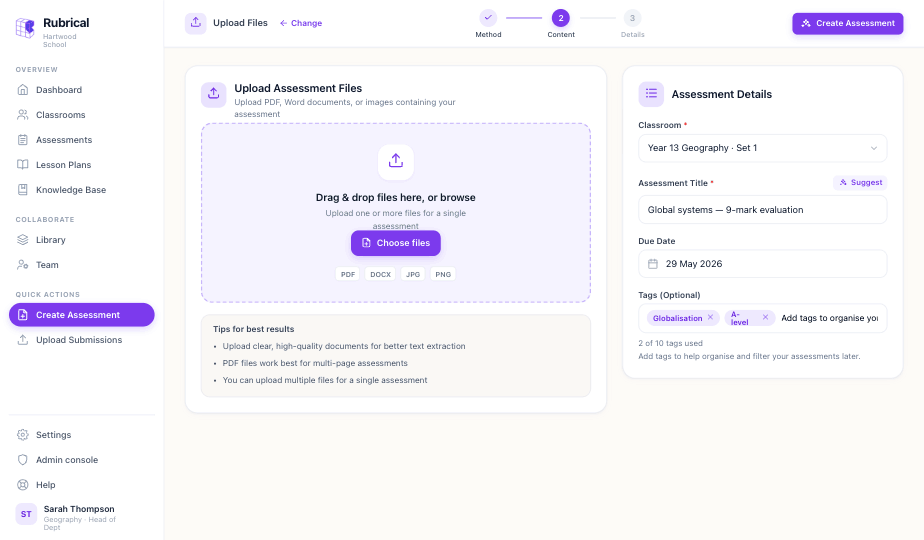
Assessment creation
Upload a paper or mark scheme and Rubrical reads it, or build a rubric from scratch. It pulls out the questions, marks and assessment objectives so the marking is ready to go.
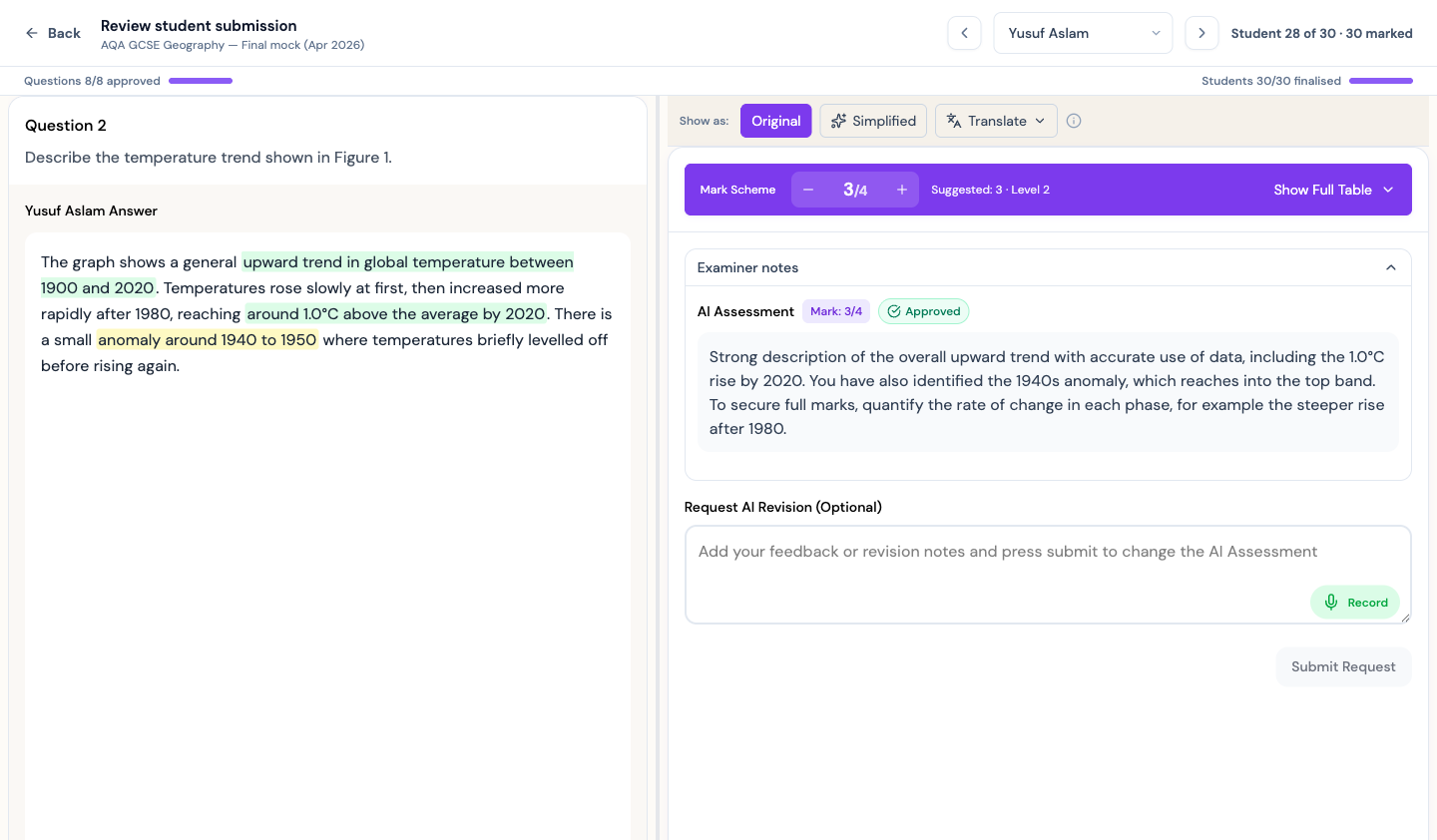
Marking & feedback
The heart of Rubrical. AI marks each answer against your rubric, shows its reasoning, and drafts feedback in your students' words. You review, adjust and return.
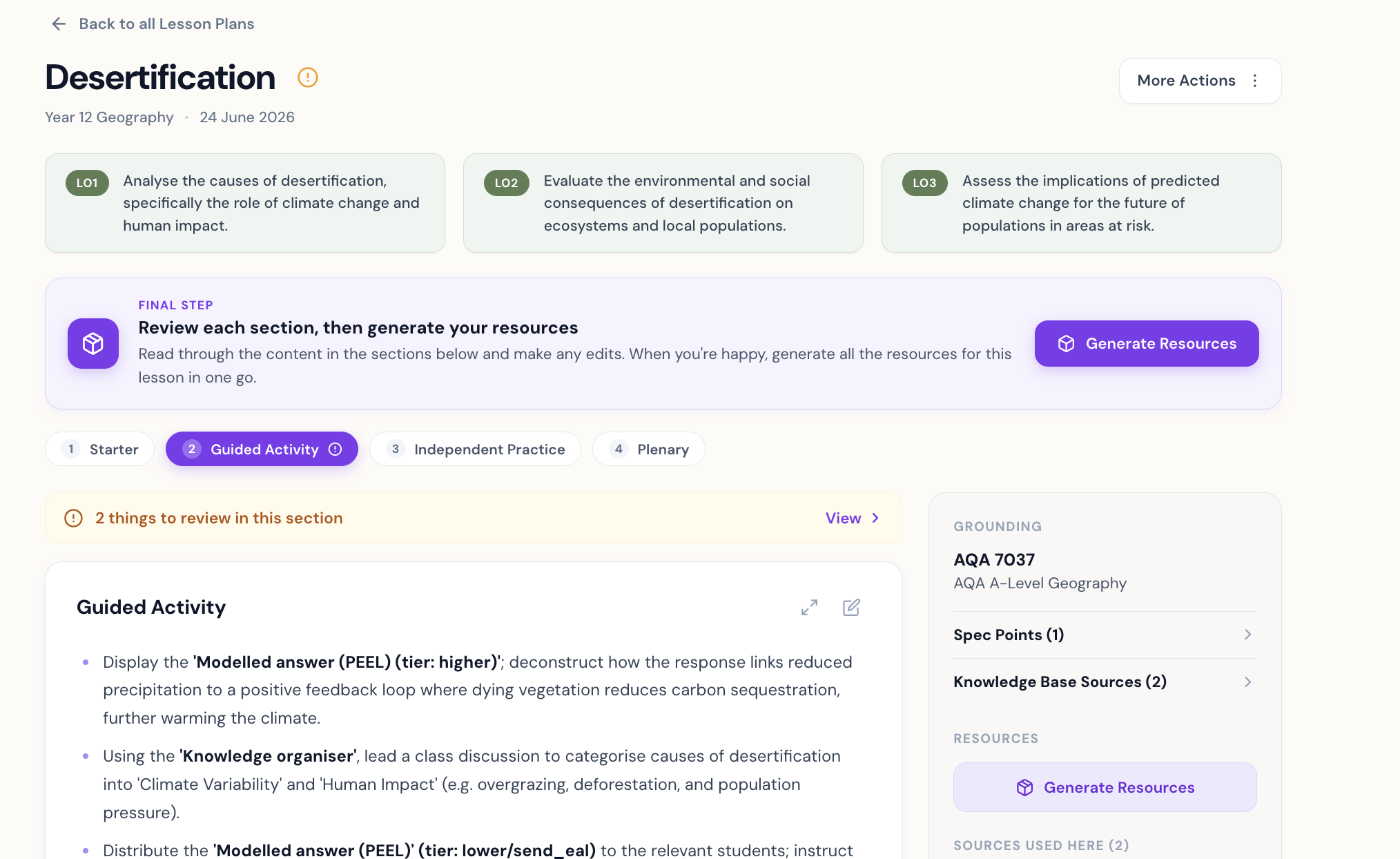
Lesson planning & resources
Pick a class and your spec points. Rubrical drafts objectives, a timed lesson and tiered resources, grounded in sources you can check, with anything uncertain flagged for you.
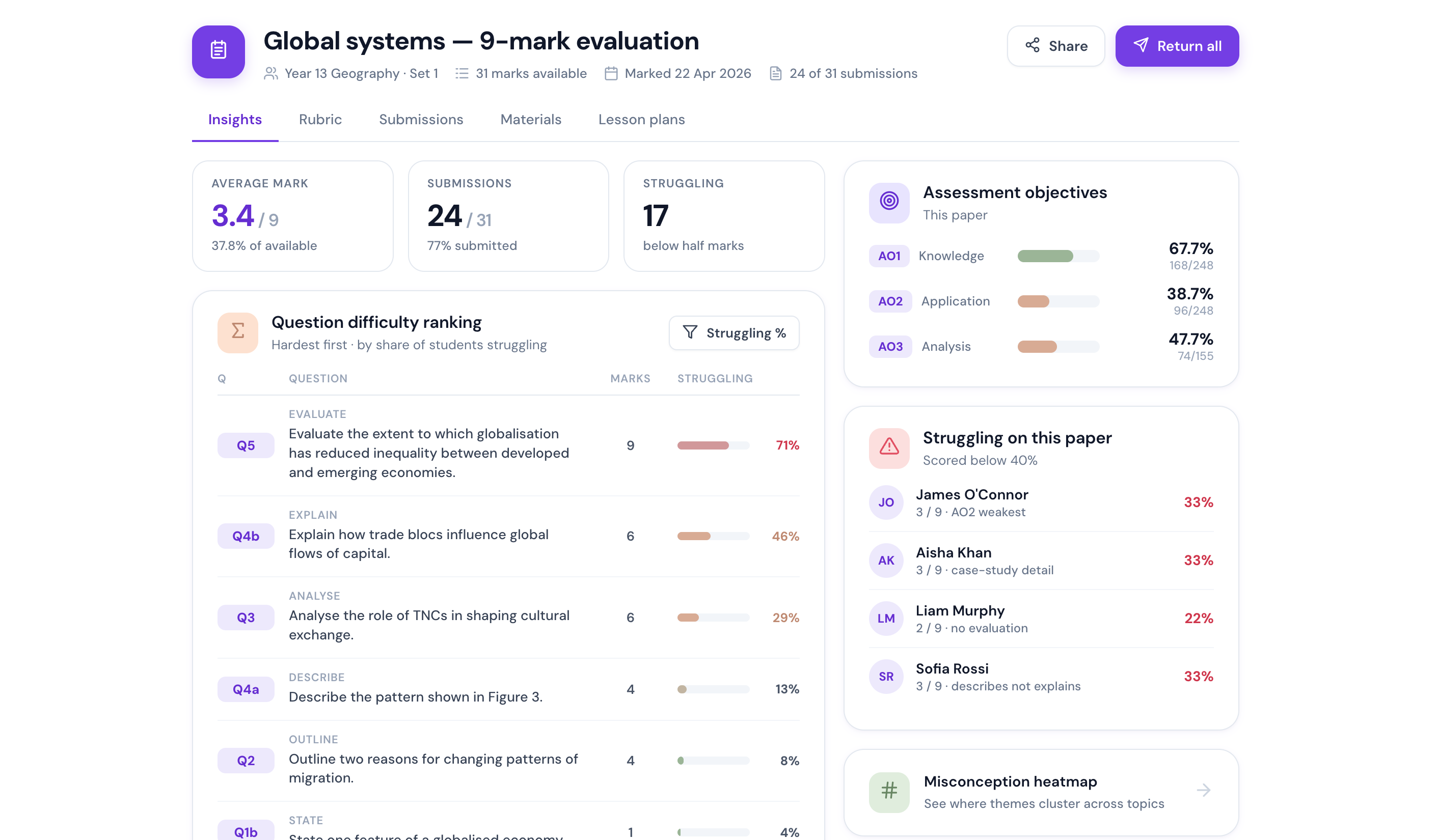
Analytics & insight
As you approve marks they roll up on their own, surfacing the assessment objectives a class is weakest on and the students who need you first. Ask it anything in plain English.
Misconception heatmaps
Spot the errors that cluster across a topic.
Exam-board aligned
Aligned to the objectives you teach, across the major UK exam boards.
Built for every learner
OpenDyslexic, text size and EAL translation.
Google & Microsoft
Bring in work from the tools you use.
Is the AI actually any good?
It's the first thing every teacher asks. Here's the honest answer.
It marks to your rubric, not a hunch
Every answer is assessed against your levels and assessment objectives, with the evidence highlighted in the student's own words. You can see exactly why each mark was given, and change anything you don't agree with.
You have the final say, every time
Rubrical drafts; you decide. Nothing reaches a student until you approve it. It's a head start on the marking, never a replacement for your judgement, so the feedback stays yours.
Up and running the same day
Create an assessment, import the work from Google Classroom or Microsoft, and start marking. No training course, no rollout project, no manual. If you can mark a paper, you can use Rubrical.
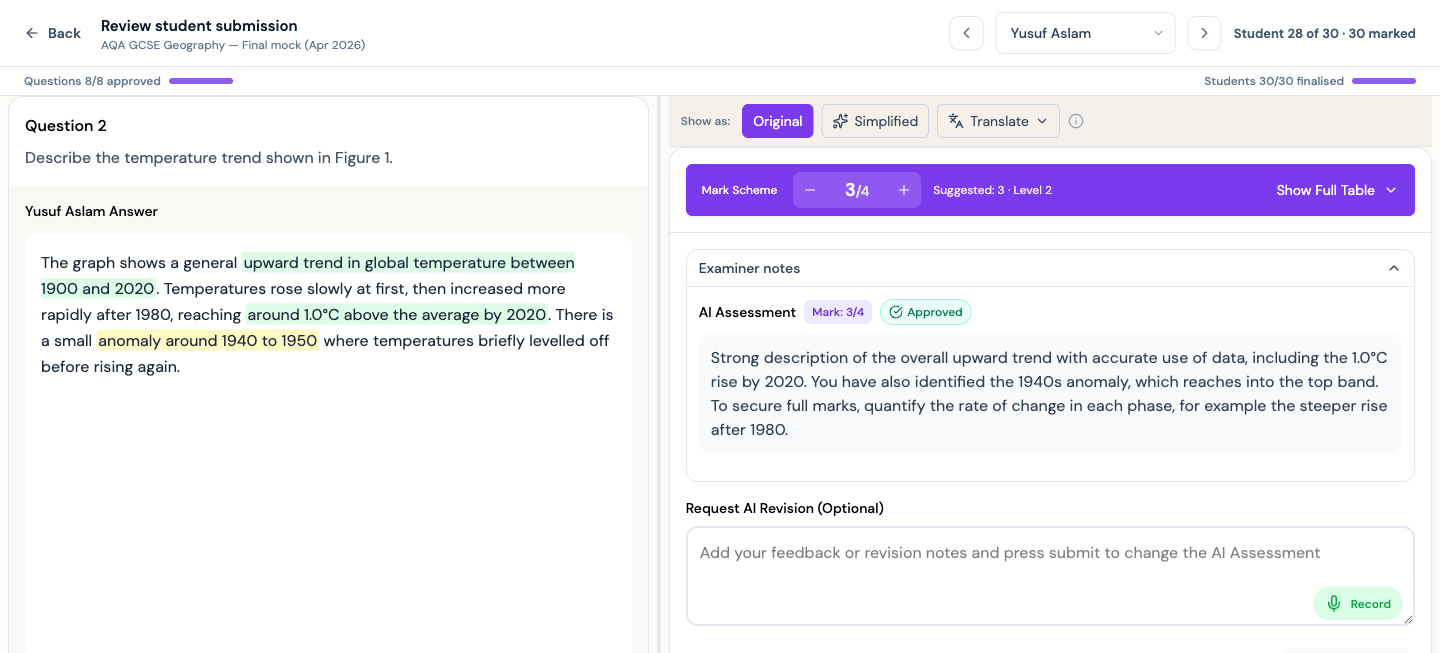
The AI does the first pass. The judgement is yours.
Every answer comes back marked against your rubric, with the reasoning shown next to the mark scheme and the evidence highlighted in the student's words. You can see exactly why a mark was given.
- See the reasoning behind every mark, mapped to each assessment objective.
- Edit a comment, change a mark, or ask Rubrical to re-mark with a note.
- Nothing returns to a student until you press approve.
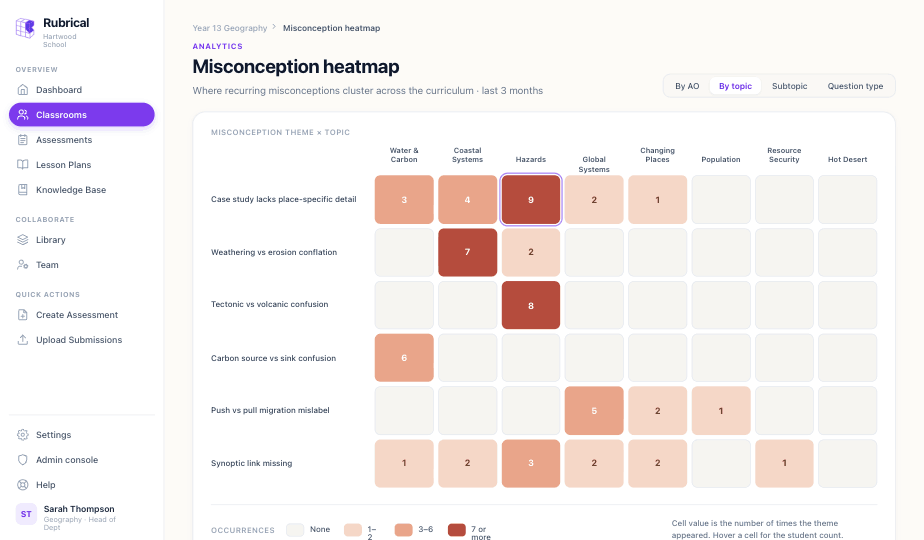
A clear read on the whole department, without the spreadsheets.
As marks are approved they roll up into a picture you can act on. Find the topics a cohort struggles with, the assessment objective that needs work, and the students who need you first.
- AO-by-AO breakdown across a class, a year group or the department.
- Misconception heatmaps that show where errors recur across the curriculum.
- Consistent marking standards across every teacher and set.
Built for everyone the marking touches.
One platform, three jobs done. Whether you're in the classroom or running the department, Rubrical earns its place.
Get your evenings back
Mark a full set in a fraction of the time and still read every script. The feedback gets done, the marks are evidenced, and it still sounds like you.
One standard, every teacher
See the whole cohort by assessment objective, find the topics to reteach, and know a mark means the same thing whoever gave it.
Evidence, and time given back
A clear read on attainment and intervention, built on the safe-AI direction the DfE is funding. Time returned to teaching, across the department.
Feedback every student can read.
Switch feedback into plainer language, scale the text, turn on OpenDyslexic, or translate a comment into a student's first language. The accessibility settings travel with the teacher, not the device.
Fits the way your department already works.
Aligned to your exam board, connected to the tools you teach with, and built to your school's data standards.
Designed for the major UK exam boards
Integrates with your tools
Pull student work straight from the learning platforms you already use.


Clear on data processing
Core school data sits in our London Supabase project. The processing chain covers Supabase, LMS APIs, AI processors, analytics, observability and hosting.
Named in the DfE's plan for schools.
Rubrical is one of the AI feedback tools Funded by the DfE and Innovate UK. In the DfE's publication Every child achieving and thriving, teachers using Rubrical reported a 52% reduction in marking time. We're built for exactly the future that paper describes: safe AI that supports teaching, with the teacher firmly in charge.
The things teachers ask first.
See Rubrical with your own papers.
Bring a real assessment to a short call and we'll mark it together. No slides, just your work and the tool.